NetworkMonitor
Real-Time Connection Quality & Outages on Your LCD Key
Micro-stutters during video calls? Router reboot or ISP outage? NetworkMonitor pings your critical connection destinations every 5 seconds via ICMP. A single Stream Deck key reflects real-time status in Green, Amber, or Red — complete with destination name and latency. A single keypress opens the full desktop analytics dashboard.

Why Traditional Ping Utilities Fail in Daily Practice.
Remote professionals, engineers, and traders need ultra-reliable latency. But standard diagnostic tools are clunky, disruptive, or leave you guessing.
Frustrating Guesswork During Calls
When audio drops or video stutters, is it your Wi-Fi, your router, or your ISP? By the time you open a terminal to ping, the call is already derailed.
Command Prompt Windows Clutter Screens
Keeping terminal windows running ‘ping -t 8.8.8.8’ or heavy network suites eats up monitor space and creates visual fatigue during focused work.
The Solution: Dedicated Hardware Status
NetworkMonitor offloads connectivity health directly to your Stream Deck. Glance down: Green is solid, Amber warns of latency spikes (≥150 ms), Red flags outages.
Three Definitive States on a Single Key.
The key renders sharp vector glyphs from the Inter font family, always broadcasting the worst-performing destination:
Healthy (Optimal)
Latency < 150 ms
Every configured target responds quickly without packet loss. The key glows crisp green and shows the current latency of the slowest destination.
Degraded (High Latency)
Latency ≥ 150 ms
A destination is lagging. The key switches to amber and immediately identifies the bottleneck (e.g., Gateway or DNS) along with exact milliseconds.
Down (Outage)
Packet Loss / Timeout
A destination dropped completely. The LCD key displays an unmistakable red circled cross — alerting you before you even notice while browsing.
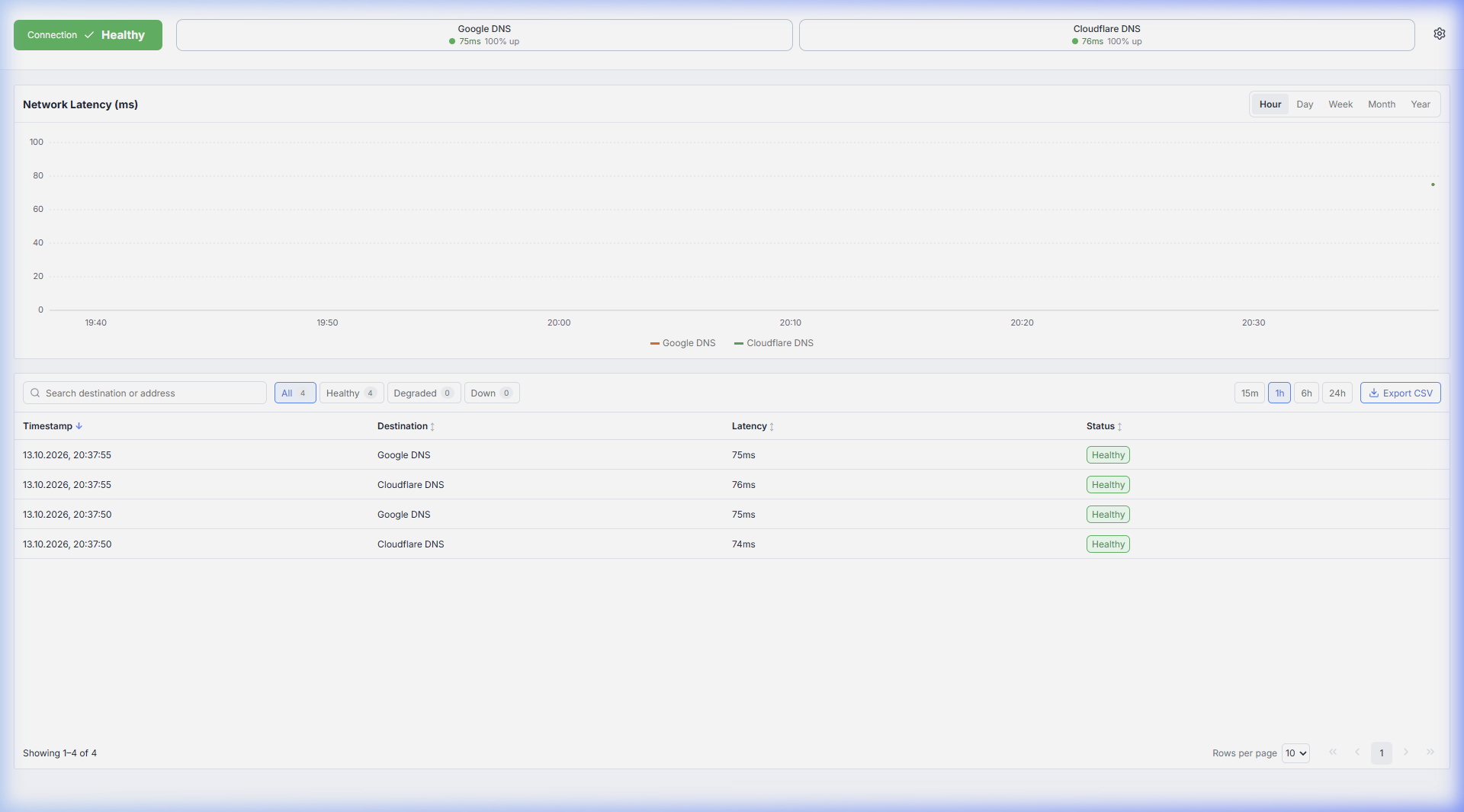
One Keypress Launches the Analytics Cockpit.
The plugin bundles the desktop application seamlessly. No separate installer needed: Press the LCD key and it opens via the custom net-uptime-monitor:// protocol.
Interactive Latency Chart
Inspect ping curves over the last 1 hour, 24 hours, 7 days, 30 days, or a whole year. Dynamic y-axis scaling, degraded latency threshold lines, and baseline outage markers.
Readings Table & CSV Export
Search by destination or IP, filter by status (Healthy, Degraded, Down), select time windows (15m, 1h, 6h, 24h), and export verified CSV logs to hold your ISP accountable.
Windows Tray & Startup
Runs unobtrusively in the Windows notification area. The tray icon mirrors overall status with hover tooltips per destination. Optional start-with-Windows keeps pings alive.
100% Offline & Private
No accounts, no cloud endpoints, no analytics. All ICMP ping data remains encrypted in local IndexedDB and your machine’s %APPDATA% directory.
Elgato Stream Deck (All models)
Windows 10 / 11 (64-bit)
5-Second ICMP Ping (Real RTT)
Up to 8 targets (IPv4, IPv6, Hostname)
CasuisTec GmbH
Questions About NetworkMonitor or Enterprise Integration?
Looking to deploy NetworkMonitor across team setups, specialized server environments, or trading desks? Inquire directly with our engineering team.