Stay Active at Your Desk Without Breaking Your Flow.
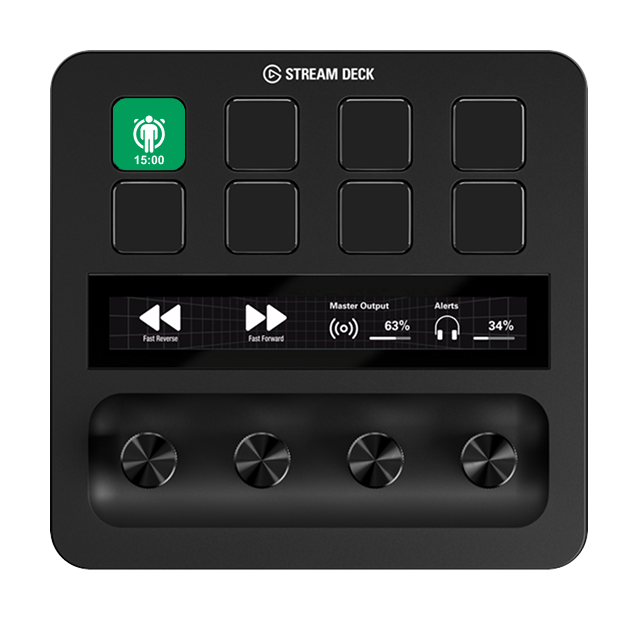
Effortless posture alternation between sitting and standing. StandUp-Timer puts continuous, non-intrusive countdowns directly onto your Stream Deck LCD key — prompting you to stand up without disruptive desktop pop-ups or window focus stealing.

Why Most Posture Reminders Get Ignored within Days.
Height-adjustable standing desks are standard equipment, yet most professionals remain seated 8+ hours straight. Traditional software solutions fail because they either intrude excessively or stop running entirely.
Intrusive Popups Break Focus
Screen-stealing desktop alerts interrupt code editing, presentations, and video meetings. After the third interruption, users permanently disable them.
Timers That Stop Get Forgotten
A countdown that rings once and stays idle requires manual restarts. Once you’re deep in your workflow, you forget to restart it for the rest of the day.
The Solution: Perpetual Hardware Nudge
StandUp-Timer runs continuously on your Stream Deck hardware LCD key, cycling automatically between sitting and standing with tactile zero-friction controls.
Continuous Cycle: Sitting vs. Standing
The single key cycles between two distinct states. When your work countdown ends, it flashes, plays a gentle reminder sound (optional), and automatically starts counting your standing session.
Deep Work Countdown
A bold countdown under the seated icon displays remaining work time at a glance (e.g. 25, 45, or 50 minutes).
Standing & Movement Interval
The key turns vibrant green with an active standing silhouette, counting down your exercise or standing period (e.g. 2, 5, or 10 min).
Full Control Through Simple Hardware Gestures
No mouse clicks required. Control your rhythm directly from the physical Stream Deck keypad with natural, responsive gestures:
Resets the current countdown back to its full duration. Perfect if you were interrupted or stepped away.
Immediately flips to the opposite mode (Sitting ↔ Standing) and starts counting right away.
Pauses the timer completely (the LCD key dims with a clean pause indicator). Tap once to resume.
Completely stops the session and returns to idle icon. The next tap starts a clean new cycle.
Tailored to Your Personal Concentration Rhythm.
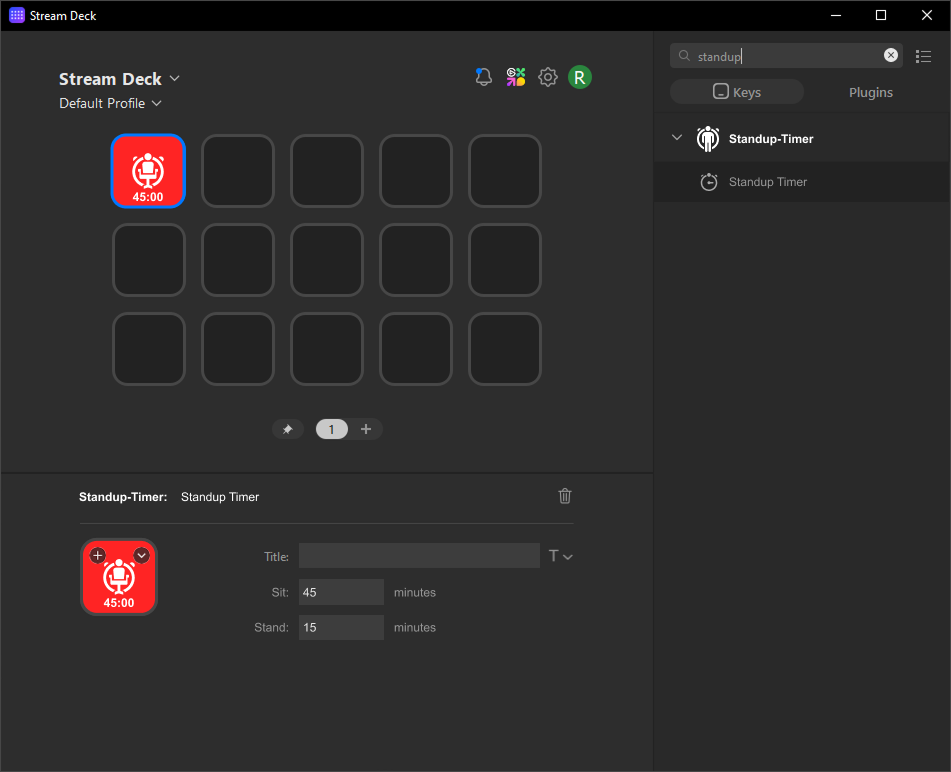
Adjust intervals live in the Stream Deck Property Inspector. Changes apply immediately to active sessions without resetting your timer.
- ✓ Custom Work Duration: Set any sitting interval (e.g. Pomodoro 25 min, ergonomic 45 min, or 50 min).
- ✓ Custom Standing Duration: Define your active break time (e.g. 2, 5, or 10 min).
- ✓ Mute Sound Toggle: Silence audio beeps while preserving tactile visual flashes and native OS notifications.
- ✓ Independent Key Settings: Place multiple keys with different durations across profiles and folders.
Built for Reliable, Day-Long Reliability.
Zero Drift & Sleep Survival
Based on a deterministic end-time state machine. If your computer goes to sleep or you lock your screen, the timer never drifts and resumes with true elapsed time.
Survives Page & Profile Switches
Switching Stream Deck profiles, folders, or pages keeps the background timer running continuously. Returning to the key immediately displays the correct remaining time.
Desktop Notifications & Sound
In addition to LCD flashes, StandUp-Timer triggers native OS desktop notifications on your main monitor and plays an audio alert so you never miss a flip.
Direct Dynamic Key Drawing
The countdown is rendered directly into the button image. No messy overlapping Stream Deck title labels or text truncation issues.
Ultralight Resource Footprint
Written with pure modern Node.js and TypeScript on official Elgato SDK v3. Zero bloated electron runtimes, consuming 0% idle CPU and mere megabytes of RAM.
Universal Global Availability
While Elgato Marketplace restricts paid plugins in many regions, purchasing directly via Lemon Squeezy gives users worldwide (including Mexico) full access.
Windows 10 / 11 · macOS 12+ (Intel & M-Series)
Elgato Stream Deck App 6.0 or later
Stream Deck, MK.2, XL, Mini, Plus, Neo, Mobile
.streamDeckPlugin (Instant 1-Click Installer)
Frequently Asked Questions
Immediately upon checkout, you will receive the official com.casuistec.standup-timer.streamDeckPlugin distribution file. Simply double-click the file on Windows or macOS. The Elgato Stream Deck app will launch and install it automatically. Then drag the “StandUp-Timer” action onto any keypad key!
The Elgato Marketplace currently restricts paid plugin acquisitions in numerous countries (including Mexico and several Latin American nations). By selling directly through Lemon Squeezy on our website, customers anywhere in the world can purchase and download the official StandUp-Timer with full support and local payment methods.
StandUp-Timer is a simple, fair 4.99 € one-time payment. There are no recurring fees or monthly subscriptions. You receive lifetime ownership including all future updates.
Our checkout partner Lemon Squeezy accepts all major Credit & Debit cards (Visa, Mastercard, American Express), PayPal, Apple Pay, and Google Pay worldwide.
Yes. A “Mute Sound” checkbox in the Stream Deck Property Inspector silences the alert audio tone while preserving the visual key flashes and native OS desktop banner notifications.
Build a Healthier Desk Routine from Today.
Install the official StandUp-Timer plugin in seconds and let your Stream Deck build your effortless, distraction-free sitting and standing rhythm.
Pay once, use forever · No subscription · All future updates included
Buy Now via Lemon Squeezy →Deploying Across Your Entire Engineering Team?
Interested in volume enterprise licensing or customized company presets for your workplace health program? Let’s connect.